
AnaCredit reportingFrom Excel to BCL SDMX-ML files
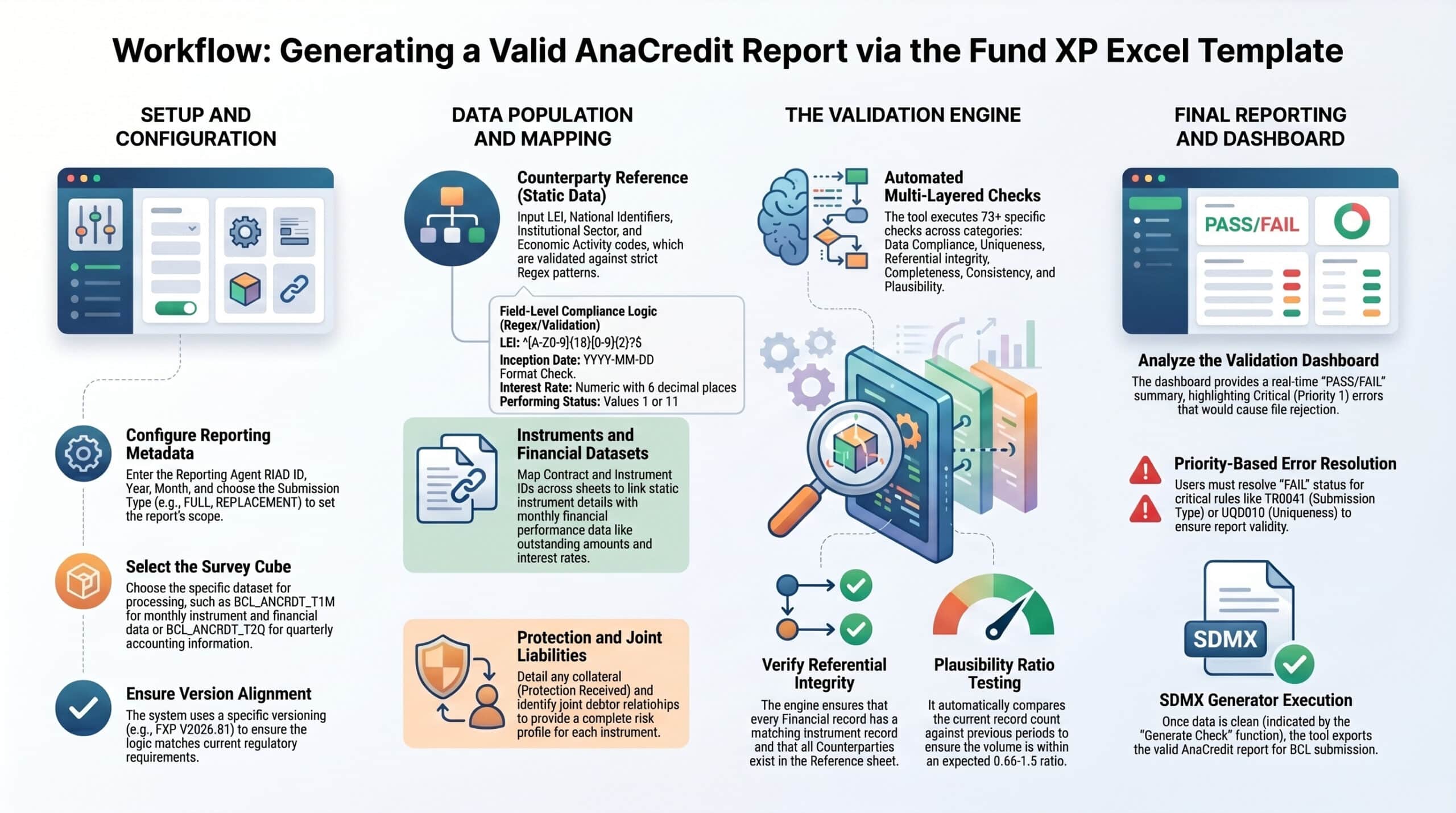
For credit institutions and foreign branches in Luxembourg. One Excel workbook covers the ten AnaCredit datasets, runs 73 checks modelled on the BCL data quality framework and generates SDMX-ML files validated against the BCL schemas, with no XML coding.
| Dimension | Checks | Status |
|---|---|---|
| Compliance | Header and parameters | No errors |
| Uniqueness | Identifiers and keys | No errors |
| Integrity | Links between datasets | 2 errors |
| Completeness | Mandatory attributes | No errors |
| Consistency | BCL and ECB rules | No errors |
| Plausibility | Volumes vs. last period | No errors |
10
AnaCredit datasets in one workbook
73
Validation checks, 17 of them critical
v1.0.13
BCL SDMX schema, from January 2026
SDMX-ML
StructureSpecificData XML for the BCL
Who reports AnaCredit
AnaCredit (Analytical Credit Datasets) is the ECB’s loan-by-loan database of credit granted to legal entities. Under Article 3 of ECB Regulation (EU) 2016/867, transposed in Luxembourg by BCL Circular 2017/240, all credit institutions and foreign branches resident in Luxembourg report, whatever their legal status.
They transmit their data to the Banque centrale du Luxembourg, which forwards it to the ECB.
Instruments covered
- Loans, credit lines and overdrafts
- Credit card debt and revolving credit
- Trade receivables and financial leases
- Deposits
Reported when the debtor’s exposure exceeds the applicable threshold.
Four BCL transmissions, one workbook
Each transmission type has its own schema and its own BCL survey code: BCL_ANCRDT_T1M, BCL_ANCRDT_T1_REF, BCL_ANCRDT_T2Q and BCL_ANCRDT_T2M.
T1M Monthly
Instruments, financial data, counterparty-instrument and joint liabilities.
- INSTRMNT
- FNNCL
- ENTTY_INSTRMNT
- JNT_LBLTS
T1_REF Reference data
Counterparty reference data for every counterparty referenced in the other datasets.
- ENTTY
T2Q Quarterly
Accounting data: carrying amount, impairment, forbearance and IFRS classification.
- ACCNTNG
T2M Protection and risk
Protection received, instrument-protection, counterparty risk and counterparty default.
- PRTCTN_RCVD
- INSTRMNT_PRTCTN_RCVD
- ENTTY_RSK
- ENTTY_DFLT
The ten datasets
Each dataset has its own worksheet. Every column maps to its SDMX attribute, as defined in the Mapping sheet.
| Dataset | Transmission | BCL cube | Main content |
|---|---|---|---|
| Counterparty reference | T1_REF | BCL_ANCRDT_ENTTY_C | LEI, national identifier, institutional sector, legal form, enterprise size, economic activity |
| Instruments | T1M | BCL_ANCRDT_INSTRMNT_C | Type, amortisation, currency, interest rate, maturity, purpose |
| Financial | T1M | BCL_ANCRDT_FNNCL_C | Outstanding nominal amount, accrued interest, default status, arrears |
| Counterparty-instrument | T1M | BCL_ANCRDT_ENTTY_INSTRMNT_C | Creditor, debtor, servicer and originator roles |
| Joint liabilities | T1M | BCL_ANCRDT_JNT_LBLTS_C | Debtors jointly liable for an instrument |
| Accounting | T2Q | BCL_ANCRDT_ACCNTNG_C | Carrying amount, impairment stage, forbearance, IFRS classification |
| Protection received | T2M | BCL_ANCRDT_PRTCTN_RCVD_C | Collateral type, value, valuation approach |
| Instrument-protection | T2M | BCL_ANCRDT_INSTRMNT_PRTCTN_RCVD_C | Links between instruments and protection received |
| Counterparty risk | T2M | BCL_ANCRDT_ENTTY_RSK_C | Probability of default |
| Counterparty default | T2M | BCL_ANCRDT_ENTTY_DFLT_C | Default status per counterparty |
73 checks, before the file exists
The Validation Dashboard recalculates as data is entered and shows each rule with its ID, category, priority, impact and error count. The checks follow the seven dimensions of the BCL data quality framework.
Data compliance
Submission type, sender RIAD code, reporting year and month, and survey code are valid before any data is processed.
Uniqueness
Counterparty identifiers, LEIs, instrument key pairs (contract ID and instrument ID), protection identifiers, and risk and default records are unique in their datasets.
Referential integrity
Every financial record matches an instrument and has a creditor and a debtor; every accounting record matches a financial record; every counterparty referenced exists in the counterparty reference dataset.
Completeness
Mandatory attributes are present: type of instrument, currency, inception and legal final maturity dates, interest rate, default status, outstanding and off-balance-sheet amounts, impairment and key counterparty fields.
Consistency (BCL)
Enterprise size and its date are reported together, legal proceedings status and date match, other entity identifier and its type align.
Consistency (ECB)
Settlement date on or after inception date, legal final maturity on or after settlement, no inception date in the future, default and past-due dates consistent with inception.
Plausibility
Record counts of the ten datasets are compared with the previous period, using the BCL 0.66 to 1.5 ratio, so that implausible volume changes are flagged before submission.
| Priority | Checks | Effect |
|---|---|---|
| 1 – Critical | 17 | Record or file rejected by the BCL. The XML is not generated until they are solved. |
| 2 – High | 28 | Correction required before submission. |
| 3 – Medium | 28 | Correction recommended. Flagged for review, generation not blocked. |
Built for the BCL, not a generic SDMX tool
Plain-language entry, BCL codes in the file
Teams choose readable labels from drop-down lists. The generator writes the BCL code in the XML: “Loans other than overdrafts” becomes 1004, “Variable” interest becomes 2.
Dates converted automatically
Dates entered in Excel are converted to the ISO 8601 format required by the BCL schemas when the file is created.
Header and submission parameters
Sender RIAD code, reporting and observed agent RIAD IDs, reference period, survey code, submission type and emergency flag, checked by rules TR0041, TR0120, TR-YEAR, TR-MONTH and TR-SURVEY.
Several observed agents
The reporting agent and the observed agent are configured separately, for an entity that reports its own book and those of its foreign branches.
Mapping sheet as a reference
Every field with its SDMX attribute name (such as ENTTY_ID, CNTRCT_ID or OTSTNDNG_NMNL_AMNT), its code translations and the regex pattern of a valid value.
No installation
A self-contained Excel workbook: no server, no XML coding. Data from a core banking system can be pasted from CSV extracts.
Readable labels, correct codes
A few examples of the translations applied by the Mapping sheet when the XML is created.
| Attribute | Label entered in Excel | Code in the XML |
|---|---|---|
| Type of instrument | Loans other than overdrafts… | 1004 |
| Type of instrument | Overdrafts | 20 |
| Type of instrument | Credit lines other than revolving credit | 1002 |
| Type of instrument | Credit card debt | 51 |
| Type of instrument | Trade receivables | 71 |
| Type of instrument | Finance leases | 80 |
| Institutional sector | S.11 Non-financial corporations | S11 |
| Institutional sector | S.122A Credit institutions | S122_A |
| Default status | Not in default | 14 |
| Default status | Default because unlikely to pay | 19 |
| Default status | Default because more than 90/180 days past due | 20 |
| Interest rate type | Fixed / Variable / Mixed | 1 / 2 / 3 |
| Performing status | Performing / Non-performing | 11 / 1 |
| Type of impairment | Stage 1 / 2 / 3 (IFRS) | 23 / 24 / 25 |
From your credit data to the BCL
Set the header
RIAD codes of the sender, reporting agent and observed agent, reference period, survey and submission type.
Enter or paste data
Fill the ten dataset sheets, or paste the CSV extracts of your core banking system.
Review the dashboard
Solve the critical and high-priority errors, and decide on the medium ones.
Generate and submit
Create the SDMX-ML file with the right codes, dates and agent identifiers, ready for the BCL.
Frequently asked questions
Who has to report AnaCredit in Luxembourg?
Under Article 3 of ECB Regulation 2016/867, transposed by BCL Circular 2017/240, all credit institutions and foreign branches resident in Luxembourg report, whatever their legal status. They send their data to the BCL, which forwards it to the ECB. Loans, credit lines, overdrafts, credit card debt, revolving credit, trade receivables and financial leases are covered when the debtor exposure exceeds the threshold.
What format does the BCL expect?
SDMX-ML StructureSpecificData XML files, validated against the BCL XSD schemas (version 1.0.13 from January 2026) and the BCL and ECB constraint overlays. Each attribute uses BCL coded values, and a wrong code, a missing namespace or an element out of sequence makes the file fail validation.
How many checks does the workbook run?
73 checks in seven dimensions that mirror the BCL data quality framework: 17 critical checks that block file generation, 28 high-priority checks to correct before submission and 28 medium checks flagged for review.
Which schema version and instructions are supported?
BCL AnaCredit schema version 1.0.13 and the BCL reporting instructions version 4.6 of October 2025, including the data quality indicator framework applied from November 2025. The workbook version (V2026.01) is shown on the Header sheet.
Can one workbook cover foreign branches?
Yes. The reporting agent RIAD ID and the observed agent RIAD ID are set separately on the Header sheet, and each XML file carries the correct agent identifiers.
Does it reduce BCL quality feedback?
Yes. The BCL’s own logic runs before the file exists, so referential integrity errors, such as a debtor without a counterparty reference record, are flagged at entry rather than in a quality feedback weeks later, with less pressure on the correction deadline of the 15th working day.
How fast can a first file be produced?
The workbook needs no installation. Configure the Header sheet, enter or paste the data in the ten dataset sheets, review the Validation Dashboard and generate the XML.
Official AnaCredit documents
The reference documents published by the BCL and the ECB.
BCL legal framework
BCL reporting instructions
BCL SDMX schema versions
| Version | Mandatory for | Downloads |
|---|---|---|
| v1.0.13 Current | From January 2026 | ZIP · Technical specifications · Cube structure |
| v1.0.12 | September to December 2025 | ZIP · Technical specifications |
| v1.0.11 | March to August 2025 | ZIP · Technical specifications |
| v1.0.10 | April 2024 to February 2025 | ZIP |
Other reporting solutions
Your next AnaCredit submission, checked before it leaves
First submission, recurring quality feedback or too much manual work: tell us how you report today and we will show you the workbook on your structure.