
CSSF U1.1 reportingMonthly fund figures, in CSSF XML
Prepare the monthly U1.1 report required by CSSF Circular 15/627 for UCIs, SIFs and SICARs. From your fund accounting data or an Excel template to an XML file checked against the CSSF rules and named for submission, ready before the 10th calendar day.
| Items | Content | Checks |
|---|---|---|
| 20xx | UCI information | No errors |
| 30xx | UCI financial information | No errors |
| 40xx | Share classes | No errors |
| 50xx | Share class figures | 1 error |
| 60xx | Income and expenses | No errors |
Monthly
Report for every reference month
10th
Calendar day of the following month
15/627
CSSF circular
XML
With the CSSF file naming convention
Who must file the U1.1 report
The reporting obligation applies to all Luxembourg-domiciled investment funds supervised by the CSSF under the three laws below.
UCIs
Undertakings for collective investment, Parts I and II.
- Law of 17 December 2010
SIFs
Specialised investment funds.
- Law of 13 February 2007
SICARs
Investment companies in risk capital.
- Law of 15 June 2004
What the report contains
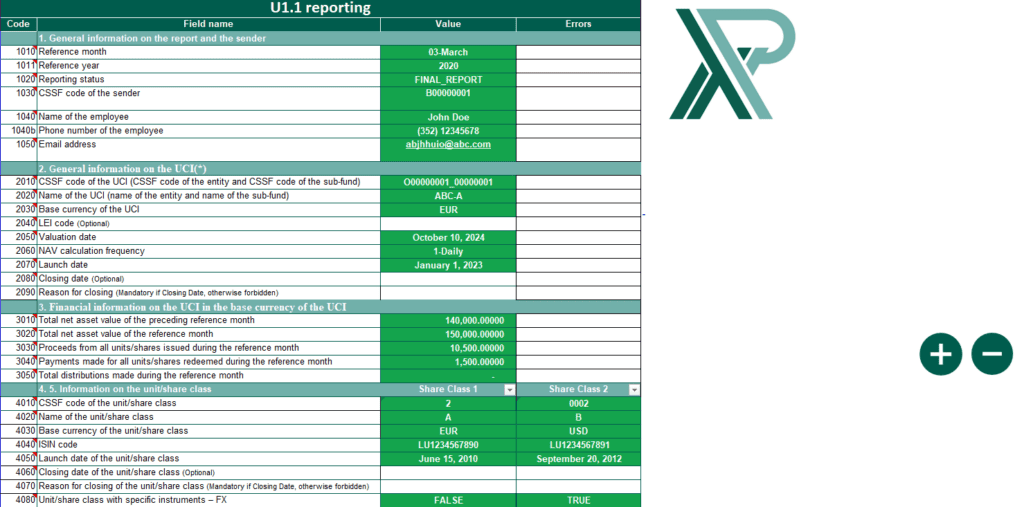
The U1.1 report combines information on the UCI as a whole and on each unit or share class, with monthly flows and the investment income and expenses of the month.
| Items | Section | Main content |
|---|---|---|
| – | Report and sender | General information on the report and the sender |
| 20xx | UCI | LEI, valuation date, NAV frequency, launch and closing dates |
| 30xx | UCI financial information | Total NAV, proceeds from units issued, payments for units redeemed, total distributions, in the UCI base currency |
| 40xx | Unit / share class | General information on each class, closing date and reason |
| 50xx | Unit / share class figures | Units outstanding, NAV per unit in the UCI and class currencies, net return, issues, redemptions and distributions |
| 60xx | Income and expenses | Dividends, interest on bonds, bank interest, other income, charges, performance fees, other expenses, realised and unrealised profit or loss |
What the solution does for you
Checks against the CSSF rules
Every value is validated before the file is created, so the report respects the CSSF requirements and its consistency rules.
Data from your systems
Information is collected and organised from fund accounting, portfolio management and trade execution systems, whatever their format.
Built for volume
The solution handles large numbers of funds and share classes and grows with your management company.
Excel template for smaller ranges
For a few funds, an intuitive Excel template with drop-down lists and date pickers guides the entry.
On time, every month
Automated production lets you meet the 10th calendar day deadline with up-to-date figures.
Filing and support
Files are ready for electronic filing. As an option, we file them securely with the CSSF and follow up on the feedback. Documentation and help are included.
See the U1.1 solution in action
A short demonstration. The player loads only when you click.

From your data to the CSSF
-
Collect
Import the extracts of your accounting systems, or fill in the Excel template.
-
Check
Each error is shown with its reason and the item concerned.
-
Generate
The XML file is created with the CSSF naming convention.
-
File
Send it encrypted through your transmission channel, or let us file it and follow up.
Example of a file name: U11REP-B00000012-O00008450-00000002-201512-RAP-1421893257541.xml
Reporting rules by situation
The values the CSSF expects in the special cases of the life of a fund or a share class.
Provisional report copying the previous month
If the provisional figures repeat the previous total net asset value (item 3020 copied from item 3010), enter:
| Item | Field | Value |
|---|---|---|
| 3030, 5050 | Proceeds from units issued | 0 |
| 3040, 5060 | Payments for units redeemed | 0 |
| 3050, 5070, 5080, 5090 | Distributions | 0 |
| 5010 | Units outstanding | Same as previous month |
| 5020, 5030 | NAV per unit | Same as previous month |
| 5040 | Net return per unit | 0 |
| 6010 to 6100 | Investment income and expenses | 0 |
Last final report of a UCI
Submitted for the month in which the UCI closes, is liquidated, merges with another UCI or abandons its UCI status.
| Item | Field | Value |
|---|---|---|
| 2080 | Closing date | Date on which the last investors exit |
| 2090 | Reason for closing | 1, 2, 3, 4 or 5 |
| 3020 | Total NAV | Value of the remaining assets in liquidation |
| 3030 | Proceeds from units issued | During the reference month |
| 3040 | Payments for units redeemed | During the reference month |
| 3050 | Total distributions | During the reference month |
In a merger, the absorbing UCI reports the units converted from the absorbed UCI as subscriptions in item 3030. In a temporary closure, submit a null report for the following months (option 4 in item 2090).
Last null report of a UCI
Submitted for the month in which the UCI definitively closes down.
| Item | Field | Value |
|---|---|---|
| 2040 | Legal Entity Identifier | LEI, if available |
| 2050 | Valuation date | Definitive closure date |
| 2060 | NAV calculation frequency | 1 to 20 |
| 2070 | Launch date | Closure date |
| 2080 | Closing date | Definitive closure date |
| 2090 | Reason for closing | 5 |
The closure date of item 2080 is also reported in items 2050 and 2070.
Closing a unit or share class
A fully redeemed class is included for the last time in the report for the month of redemption.
| Item | Field | Value |
|---|---|---|
| 4060 | Closing date | Date on which the last investors exit |
| 4070 | Reason for closing | 1, 2, 3 or 4 |
| 5010 | Units outstanding | 0 |
| 5020, 5030 | NAV per unit | Last NAV per unit |
| 5040 | Net return | Performance between the previous and the last NAV |
| 5050 | Proceeds from units issued | During the reference month |
| 5060 | Payments for units redeemed | During the reference month |
| 5070, 5080, 5090 | Distributions | During the reference month |
Frequently asked questions
What is the CSSF U1.1 report?
A monthly report that Luxembourg investment funds submit to the CSSF under Circular 15/627. It gives financial information on the UCI and its unit or share classes, including the net asset value, subscriptions, redemptions, distributions, returns and the income and expenses of the month.
What is the deadline?
The report is due every month, at the latest on the 10th calendar day of the month following the reference month.
What if the NAV is not ready by the 10th?
You still file on time: submit a provisional report with estimated figures by the 10th calendar day, then a final report with the definitive figures as soon as they are available. Provisional reports follow the same validation rules as final reports.
When is the first final report due?
For the month in which the NAV is calculated for the first time, or the month in which the first subscription is accepted and units are issued. In the second case, you may report an unofficial NAV where item 3020 equals items 3030 plus 3040, then a final report once the official NAV is calculated.
When does a new share class start reporting?
In the month in which it is activated, with a final report (and a provisional one if needed). Sections 4 and 5 are then provided as long as the class is active, whatever its NAV frequency.
Which exchange rate applies to currency conversions?
The rate at the booking date for item 5090 and at the valuation date for items 5030 and 5040. If the base currency changes during the month, report all amounts except items 5030, 5040 and 5090 in the currency valid at the valuation date (item 2050), and convert item 3010 in the first report with the new currency.
How are subscriptions and redemptions reported?
In the month in which they affect the total net asset value (item 3020). Contributions in kind, and contributions from an entity becoming a CSSF-authorised UCI, are reported as subscriptions in items 3030 and 5050.
How are all-in fees reported?
When one fee is paid to a provider who then pays the other service providers, use the same caption as in the annual accounts, based on the status of the counterparty, for example item 6061 for advisory and management fees.
What if a report is late or incorrect?
The CSSF can impose an administrative fine of EUR 125 to EUR 12,500 when reports or requested information are not submitted, or are incomplete, inaccurate or false.
Official CSSF documents
The circular, guidelines and FAQ published by the CSSF.
Other reporting solutions
Your next U1.1 report, checked before the 10th
Tell us how many funds and share classes you report. We will show you the solution on your own data.